How I keep my inbox tidy and clean
I have two email accounts:
- Work
- Private
The one I use the most is by far my work email. This account mostly receives emails that are addressed to me directly. My private one, on the other hand, receives some spam, which is mostly being filtered out by my spam filters, and a lot of what I call «unimportant email».
«Unimportant email» are messages that I mostly don't care about and don't want to be notified about. I'd still like to receive them and be able to review them.
The Setup
I run my own mail server. This enables me to quite easily have all new email that I haven't specifically told the mail filter to put somewhere else, to go into a special temporary folder. Every now and then I get a summary of any new messages waiting for me in the temporary inbox delivered to my regular inbox. Only messages arriving in my regular inbox will trigger notifications and, as a result, disturb me.
I maintain a whitelist on the server, which I can easily add an address to remotely, that keeps track of senders that I want email from to arrive directly in my regular inbox.
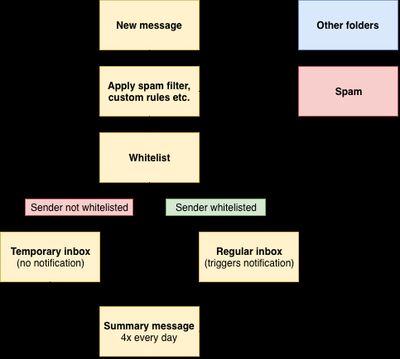
By applying this technique I'm making sure that only important messages lands in my inbox. All the other cruft I can review and organize whenever I have the time and energy needed to do so.
Kudos to @enpo for mentioning this technique to me and helping me with the bash one-liners that does all the dirty work.
Next steps
Here are a few things you can do:
- Reply to this post by email – I’d love to hear from you.
- Browse all writing
- Subscribe via RSS or email to stay in the loop.
- Reach out on Mastodon – I’m always happy to chat.
2026
September
-
Note
As quite evident by looking at my brand new reading page, I haven't read very much this year. Going forward I will do my very best to finish the books I'm currently reading and find some new exciting books to read. Currently only finished three, the goal is 10!
-
Note
I just ordered a Fairphone 6+, Fairbuds and Fairbuds XL.
I have an iPhone 17 as my daily driver, but I couldn't help but order this phone and headsets once I became aware it was a thing.
My plan is to switch to all of these things, replacing my iPhone 17, AirPods Pro 3 and Bose QuietComfort Ultra. These will either be sold or given to someone who needs them.
The initiative is great and their values even better. We need companies trying to counter the enormous pressure laid upon all of us to keep buying stuff all the time.
I will post a thorough review of these items once I've used them for a while.
-
Tømmerneset rock carvings
2025
April
-
Note
I will be posting changes to my website simply as notes tagged with
changelog. This is the very first changelog of this site, and it summarizes the most important changes I've done since I started wiping the dust of this site in April this year.- I've added a Buttondown newsletter integration. Whenever I publish a new post on my blog, an email will be sent to my subscribers.
- I've added a «Reply by email» button to all content. Do not hestitate to contact me if you have comments or feedback. Getting feedback is a big part of why I blog in the first place — I enjoy hearing from readers and being part of a thoughtful exchange now and then.
- I've added a Search feature using Pagefind. It's not yet fully configured or customized, but it's working.
- Added links to previous and next post, note and link.
- Added a 404 page.
- Reduced the size of uncompressed resources being loaded on the front page to 66 kB. Submitted a PR to be added to the 512kb.club website.
-
Our dog: Kento
-
Note
This is the very first note on my new website. It's a GREAT note.
It doesn't say much, but still – it marks the beginning of a new note-hosting era for this website.
-
Back to basics – again..